

Custom T-shirt printing has never been more popular. From personal fashion statements to corporate branding and community events, a printed shirt is a canvas for creativity and identity. But here’s the truth: no matter how great your design looks on screen, it won’t come out right unless you use the right image type, file size, and printing method. That’s where knowing the basics—like DPI, garment dimensions, and printing techniques such as Direct-to-Film (DTF)—becomes essential.
This guide will walk you through image specifications, file sizes, printing requirements, and garment sizing. You’ll also see practical examples to make sure your next print project looks sharp and professional.
Click Here to Order Custom-Printed Shirts!
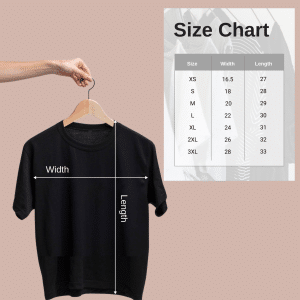
Image Type Specifications
Not all images are created equal. When it comes to printing:
-
Vector Graphics (AI, EPS, PDF, SVG): Best for logos and line art. They scale infinitely without losing quality.
-
Raster Images (PNG, JPEG, TIFF, PSD): Best for photos and complex artwork. Must be high-resolution for clear prints.
-
Resolution: Always aim for 300 DPI (dots per inch). A 72 DPI image (standard web resolution) will look blurry on fabric.
-
Color Mode: Use CMYK for accurate print colors. RGB is for screens.
File Size Requirements
Large file sizes don’t always mean high quality, but too small a file is a recipe for disaster.
-
Logos & Small Graphics: Minimum 1–2 MB in vector format.
-
Full-Front Prints: At least 5–10 MB raster file at 300 DPI.
-
Photographic Prints: TIFF or PSD preferred, 20 MB+ depending on design.
Pro Tip: Don’t stretch a small image. Always design at the final print size or larger.
Printing Size Chart for Different Garments
| Garment Type | Common Print Area | Recommended Print Size |
|---|---|---|
| Adult T-shirt | Chest | 12” x 16” |
| Hoodie | Front Pocket Area | 10” x 10” |
| Kids T-shirt | Chest | 8” x 10” |
| Long Sleeve Tee | Sleeve Print | 3” x 14” |
| Tote Bag | Center Panel | 10” x 12” |
| Back Print (All) | Between Shoulders | 12” x 16” |
DTF Printing Options
Direct-to-Film (DTF) is changing the game for custom T-shirt printing.
-
What It Is: A process that prints your design onto a special film, then transfers it to fabric using heat.
-
Why It’s Great: Works on cotton, polyester, blends, dark or light garments.
-
Durability: Wash-resistant and flexible—designs don’t crack or fade easily.
-
Color Accuracy: Bright, full-color prints with smooth gradients.
Compared to screen printing or vinyl, DTF is faster, more versatile, and better suited for small-to-medium print runs.
Practical Examples
-
Example 1: A startup with a bold logo should use vector graphics to keep edges crisp on both tees and hoodies.
-
Example 2: An artist selling photographic prints should work with TIFF files at 300 DPI for rich detail.
-
Example 3: An event organizer printing kids’ shirts must resize graphics to smaller dimensions while keeping file resolution high.
Summary
The secret to flawless T-shirt printing isn’t just a great design—it’s about meeting the right image, file size, and garment requirements. Whether you’re a business owner, a designer, or someone planning an event, using vector graphics, high-resolution files, and printing methods like DTF ensures your T-shirts look professional and lasting.
So next time you’re preparing artwork for print, think beyond the screen—think about the fabric, the file, and the finish.